

Think your website is perfectly optimized technically? My long experience with technical audits would disagree with you. For more than six years I have never once analyzed a site without technical errors, even if it was an audit of the work of a third-party agency or specialist. On medium and large projects, even with a regular full site audit, it is almost impossible to keep track of the full technical health of the resource in the endless succession of changes and improvements made to the site.
This block contains the most common errors that occur on 90% of all sites being checked. They are easy to diagnose and fix. I advise you to check them first, because the probability of their detection on your site is very high.
When launching a new website, it is important to identify the main mirror. There are 4 options:
| http://site.com/ | http://www.site.com/ | https://site.com/ | https:/www.site.com/ |
*in very rare cases the site is displayed using the 5th option, a URL with an IP address like: xxx.xxx.xxx.xx.xx.xx:xx or site.com:xx.
Search engines consider these versions to be different sites and will see them as complete duplicates with an attempt at search engine spam.
Less common is the case when the mirrors are glued, but this is implemented through 302 redirect (302 Moved Temporarily), which unlike 301 redirect (301 Moved Permanently), informs the search engine robot about the temporary, not permanent movement of the page to a new address, because of which it may not index the final URL of the redirect and leave the initial URL in the index.
How it should be: A 301 redirect (301 Moved Permanently) from all possible versions of the site to the main version is set up to avoid complete duplicates of the resource.
There are many possible types of generated duplicate pages by different CMS sites. Below are the most common examples of errors:
| Type of redirect | Possible take | Possible original |
| Processing / at the end of the URL | https://site.com/category | https://site.com/category/ |
| Superfluous / in the URL structure | https://site.com/category//https://site.com///category | https://site.com/category/ |
| Upper case URL | https://site.com/CaTEgory/ | https://site.com/category/ |
| Index copies of files | https://site.com/index.phphttps://site.com/index.html | https://site.com/ |
| Hosting index copies | https://site.com/index.htm | https://site.com/ |
If you don’t set up 301 redirects from other versions of pages, they will create full or partial copies of each other, which search engine robots perceive as spam and duplicate content, which ultimately prevents the normal ranking of the main version.
How it should be: A version of a website page should only be found at one URL. Search engines consider any change in the URL to be a completely different page that is a duplicate of a useful promoted page.
Many experts close pages from indexing through the robots.txt file, which is only a recommendation to crawl, not an ultimatum.
How it should be: All pages undesirable to get into the index are closed through <meta name=”robots” content=”noindex, follow” />. The dofollow or nofollow value is set depending on the content of the pages.
It is a common mistake to add incorrect recommendations to scanning search robots in the robots.txt file not to index all pages of the site containing get-parameters, the rule Disallow: /*? in its various variations, or close system folders like Disallow: /wp-content/. Some CMS have recommendations to add a basic robots.txt file with this error.
When adding, no one takes into account what those rules hurt with links to media files, scripts and styles, for example:
*.css? ver=45 or
*/wp-content/plugins/*jquery.modal.min.css

Even given the recommendatory nature of the file, GoogleBot may not always be able to correctly process and perceive the page later on due to scanning errors of individual elements.
How it should be: To avoid duplicate content on sites with many unnecessary pages with get-parameters, and not to harm page rendering by search engine robots, rules are used to specify canonical pages using <link rel=”canonical” href=”[url]” /> for all pages containing get-parameters, except for pagination pages (if they are implemented as ?page=n and not /page-n/).
The site generates sitemap.xml and does not set the rules for adding new links and auto-update cycle. Thus, the file contains links with server response codes 30X, 40X, closed to indexing in noindex or non-canonical pages, which prevents search engine robots to correctly process the file and spends extra crawling budget to re-crawl unnecessary pages.
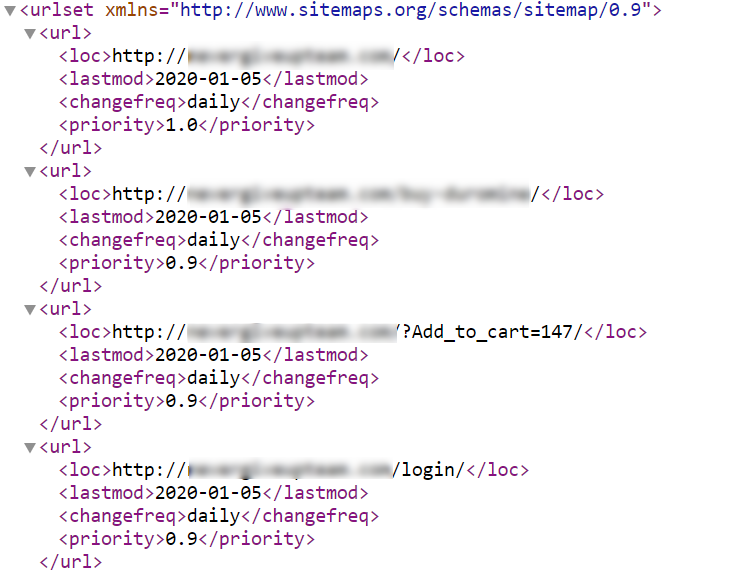
As it should be: The file contains only links open for indexing and with a 200 OK response code. When new indexable URLs are added, they are automatically added to the sitemap. The file is self-updated in a configurable period depending on the type and size of the site.
There are several problems associated with optimizing a 404 error page, and all of them are equally common.
Non-existing pages with a 200 OK response code. Due to the lack of correct configuration, not all non-existent pages give the server response code 404 Not Found. This leads to the indexing of non-existent pages that can be generated within the site or from external links containing errors, which leads to their entry into the index of search engines and the creation of partial doubles of promoted pages.
Most often this error occurs in CMS Bitrix on pages of 3+ nesting levels and on blog pages.
The design of the 404 error page is not configured. When a user lands on a non-existent page, they see a white screen with no information or any links that allow them to return to the site.

Redirects when requesting a non-existent page. When a non-existent page is requested, a 301 or 302 redirect (even worse) to a static 404 error page occurs, which usually looks something like this:
/404-page.html. At best, this page gives the correct response code, but often it is an indexed page with 200 server response code.
How it should be: All non-existent pages on the site give a 404 Not Found response code and display a 404 error page template, which is designed in the site design template, contains additional information and exit paths from the page.
At least one of the following errors is always present.
Specifying the canonical page. Most often the canonical page is simply not defined. More rarely, the canonical page is specified incorrectly, which similarly leads to duplication.
Duplication of text on pages. The text of the divorcing page is copied on all subsequent pagination pages.
Main page duplicate. A complete duplicate of the main pagination page is present, most often available at: ?page=1, etc.
The meta generation template is not set. All meta tags and pagination page titles are duplicated.
All of the above errors lead to duplicate content and worse ranking of the affected pages.
How it should be: The pagination pages have the correctly specified <link rel=”canonical” href=”[url]” />. The text of the main pagination page is not duplicated on subsequent pages. The main page does not have a duplicate in the form of the first page.
In many CMS, meta tags Description and Title, H1 tags are not prescribed by default. On some engines, the maximum in Title is pulled H1 value, which also provokes duplication, which leads to a worsening of page ranking.

If there are no description tags, then Google independently generates a site’s snippet in the search engine, which is likely to be uninformative, which reduces the clickability rate of the site’s links to click through.
How it should be: Ideally, all information is manually prescribed following simple guidelines. In the quick variant, a generation template is set for each page type.
The site contains a large number of internal redirects or broken links. This happens with frequent changes of internal URLs of pages without configured on the engine auto-replacement in the code of the site. It also happens when you put manual linking, which then everyone forgets about and on which the rules of auto-replacement do not apply.
A large number of internal errors of the site leads to the deterioration of resource crawling due to the useless waste of crawling budget of the search robot and in some cases to the deterioration of behavioral factors.
How it should be: Non-existent pages replaced with an alternative, simply removed from the code, or removed and redirected to relevant pages, as appropriate. Redirect pages replaced with their final path. Service pages with redirects are closed from indexing.
Not the most frequent errors, but they also occur and interfere with the normal ranking of the resource. Most often such errors appear on certain types of resources, so they are not found on every site.
There are several types of links that are necessary for user convenience and fulfill only a technical role, but are useless in terms of promotion:
When clicking on such links, the search robot spends its crawling budget to scan them, which can lead to problems with the speed of resource indexing.
How it should be: It is desirable that such links are not just closed from indexing or canonicalized, but cut out of the site code altogether.
Often, when moving a site to another mirror or address, all end-to-end settings are left unchanged. The most common examples are buying an SSL certificate and changing the protocol from http to https or adding/removing the www. prefix based on someone’s fantasies that it will be better.
In these cases, the most common non-transported code customizations may be:
This leads to a complete collapse of all settings to eliminate duplicate pages or pointing to incorrect sources, creating many errors of internal pages of the site.
How it should be: When moving a site or changing the main mirror, absolutely all information and all technical settings of the site are necessarily saved and transferred as necessary, depending on the project and the type of transfer. Moving the site is a separate big topic, on which a huge technical task is drawn up to maximize the preservation of the accumulated result.
Sometimes mirrors or duplicates of technically useless pages are glued together by specifying the rel=”canonical” attribute instead of setting 301 Moved Permanently. Even if you manually set the canonical page, the Google search robot can safely choose another page, because it sees the attribute as a recommendation. If 301 Moved Permanently is set, it will have no choice.
As it should be:
All technically useless duplicate pages are glued together via 301 redirect. Exceptions are CNC links with get-parameters and service pages.
Typical mistakes are made when defining language versions via :
As it should be:
All links in the attribute are absolute, with no get parameters, and give a server response code of 200 OK. Links to all alternate language/regional versions of the page are specified, including the self-referential URL.
Quite often when developing a site create a dev. version on a separate site or subdomain and do not close it from indexing by search engines (should make you think about the competence of developers).

As a result, the site in development is already indexed. If it is completely copied from the original, it already completely duplicates all the content of the current site, lowering its ranking. New content on the site under development has already been indexed in the search engine and it has been grabbed by services that copy content, which will later make it not unique on the main site.
How it should be: All service versions of the site are closed from indexing. Minimum – noindex. Ideally, http access is closed via htaccess.
Not once have I seen tags with attributes canonical, noindex, alternate and others added to , not sections of the site.
How it should be: Add all tags and attributes as recommended in Google help so that search engine crawlers can take them into account and process them correctly.
The site may function perfectly, all pages will be displayed and work, but tons of generated pages with strange characters leading to third-party sites will appear in the output. After that, meta tags of the current pages in the output will gradually start to change and in the end, clicks on the main links of the site in the search output will also lead to a third-party site through cloaking.
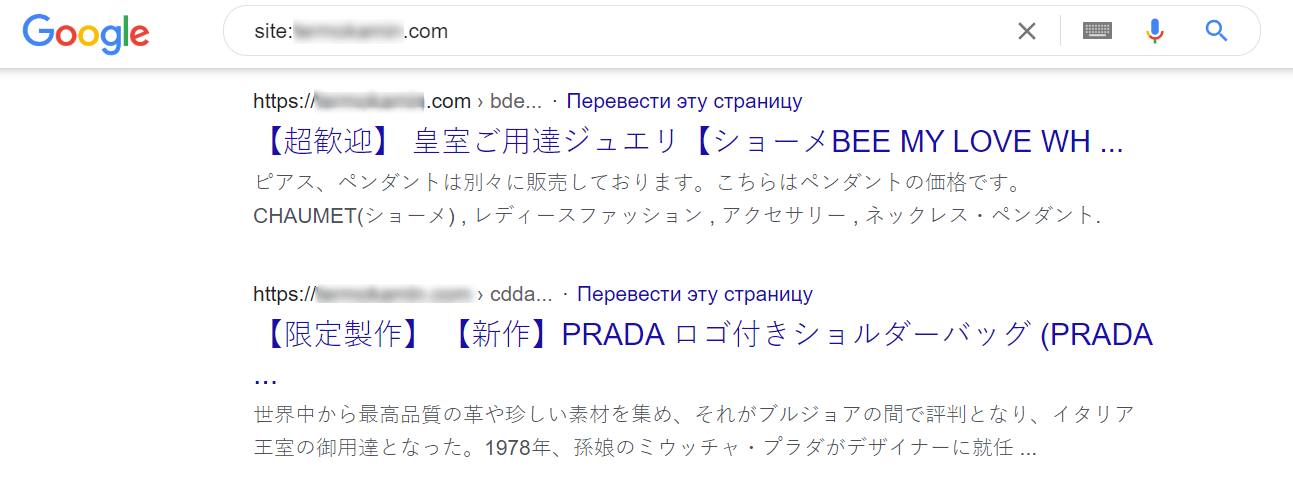
This usually occurs in the following cases:
After cleaning out all the garbage and reverting back to the old settings, the site usually recovers within 1-2 months.
How it should be: Buy and install only proven and popular design templates and plugins on your website. Download and install component updates in a timely manner. Periodically change access to your site, especially after a third-party contractor’s work.
From the professional pain section. If you’re a professional and you’re reading this, please don’t do this 🙂
Many agencies or specialists for some reason specify absolutely identical rules in robots.txt for several User-Agent: * search robots, thus making useless code duplication. In this case, you have to explain to the client why it is useless, or add a new rule for all the listed bots.

The most horrible thing that I had to see in practice – specifying the same rules for 5 different User-Agent: General, Google, Yandex, Rambler, Bing, and one of the rules had an error, which was copied to all the other bots.
Regular monitoring of the technical state of the site is necessary on all types of projects of different sizes, which change regularly. Even on our personal projects, different types of errors periodically pop up that cannot be detected without a targeted inspection, so in addition to constant monitoring, we conduct regular technical audits of all internal and client projects.
For those who have read to the end, a case in point: just a couple of weeks ago, when implementing the enhancement to bring the URLs of language versions into a single view, two doubles were generated for each promoted page of the site, which led to a loss of traffic. Without proper SEO-maintenance of the site, such an error may not be noticed or you may simply not know about its existence, which prevents you from realizing the full potential of the site.